As strange as this may seem, I am being found the most for the search term “Show Desktop Shortcut”. For those who missed it, I have an article on the main PCIN.net site called Recreate the Show Desktop Shortcut (reproduced below):
Did you know that Show Desktop is actually a script (technically Microsoft refers to it as a Windows Explorer Command)? If your Show Desktop item has been deleted, you can re-create the script quite easily. Or perhaps you’d like to create a Show Desktop item in a different folder. Simply follow these steps:
Use Notepad to create a text file with the following contents:
[Shell]
Command=2
IconFile=explorer.exe,3
[Taskbar]
Command=ToggleDesktopSave the file as Show Desktop.scf. (You can name it something else if you prefer, but make sure you use the .scf file extension.)
You can save the file where you want, and then create a shortcut on your Quick Launch toolbar.
You will also need to make sure that the SCF file extension is set up properly in Windows. The settings should be as follows:
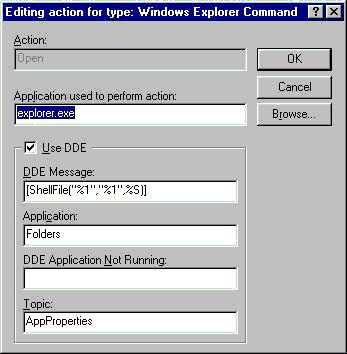
you show up for “show desktop shortcut” and yet you don’t show the shortcut? Hey buddy, you have an opportunity–nay, an obligation, to point out that (Windows)-D, is the keyboard shortcut that will show your desktop on Windows XP. Hopefully my comment will get this vital information to the public. Thanks, BTW, for your info on how to recreate said shortcut.
Since you are sharing alternatives, don’t you have an obligation to share the vital information with the public that (Windows)-M will also minimize all windows and show the desktop? 🙂
After using (Windows)-M for minimize, (Windows)-Shift-M will maximize all the windows again.
well, this re-create shortcut tip is always useful in case when you have such an incident on a remote machine and the (Windows) key cannot be used with that ease.
I don’t know a lot about computers, but I can tell you that from a non-techie point of view, this is great! I accidentally deleted mine and was not happy. Thank you so much. 🙂
Re-create the ‘Show Desktop’ Shortcut
Drat! Don’t you just hate it when you accidentally delete the ‘Show Desktop’ shortcut that sits in your quick launch bar. Well there is an easy way of producing a new one to save you some trouble next time. Just…
Cheers, has been doing my head in trying to find this. The windows website doesn’t even have it.
Muslim,
Yes it does.
http://support.microsoft.com/kb/190355
Cheers
Kelly Joyner gets pwned.