|

Not too long before writing this review, I reviewed DeskLook
2.0. Both
DeskLook 2.0 and this latest version, DeskLook
3.0 by XemiComputers
Ltd. are system tray utilities that use desktop wallpaper to display
data it reads directly from Microsoft
Outlook. DeskLook 3.0 is pretty much the same as DeskLook
2.0 with one major
difference; the desktop wallpaper that it creates is now "interactive".
You can actually click on a task, date, or mailbox and have that item open up
in Outlook.
Before reading this review, please read
the DeskLook 2.0 review. I will only
be covering the new features and any new impressions I have of the product
in this review.
Testing
The program looks exactly the same it did in the previous version. When the
program starts, it merges your Outlook data with your current desktop wallpaper
and creates new wallpaper. One thing I noticed this time was that when DeskLook
loads, it also starts Outlook in the background. This is what allows it to
monitor your Outlook data. So when I said that DeskLook used 7 MB of memory
to run, this is in addition to the amount of memory that Outlook uses. So in
order to run DeskLook 3.0 on my system, it required 15 MB of memory.
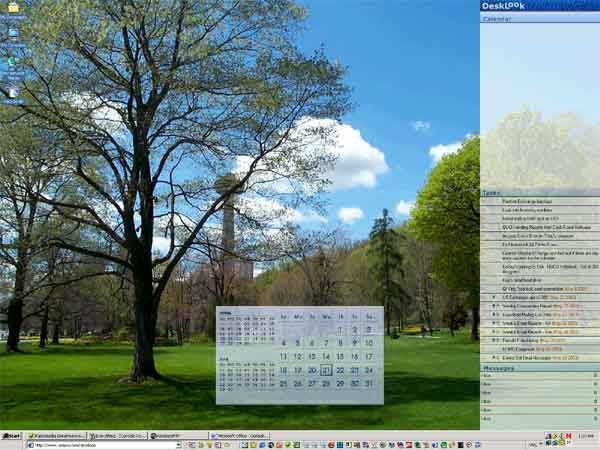
As stated in the introduction, the main difference between DeskLook
2.0 and DeskLook
3.0 is that you can click on items to open them in Outlook. It is as simple
as clicking on a date, and then Outlook opens up with that date the active
screen. If you click on a task, the same thing happens. I assumed this would
be done with the help of Active Desktop, but it isn't. When you hover over
an item on the DeskLook 3.0 wallpaper, the cursor does not change to the standard
hand/pointing finger icon that you normally see over a link. The cursor is
still a standard arrow. I'm not exactly sure how XemiComputers got this to work,
but it does nonetheless.
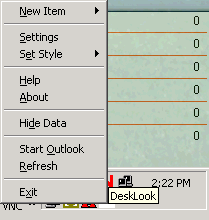
The system tray icon still exists in DeskLook
3.0, but has added functionality.
The "New Item" sub-menu at the top is new, and allows you to create new appointments,
tasks, or email messages.
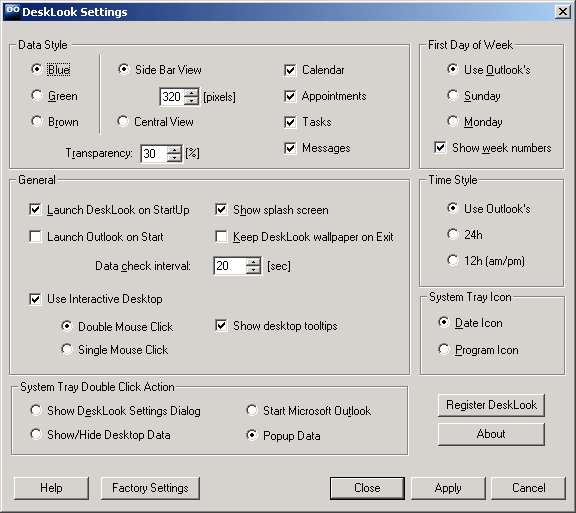
The Settings screen is essentially the same as well, except for the "Use
Interactive Desktop" options in the "General" section. You can
choose to turn off the Interactive Desktop (essentially reverting the program
back to version 2). You can also
choose whether you want to single or double-click on an item to open it.
While doing this review, I tested the "Data check interval" more
thoroughly. This setting determines how often the program will check Outlook
for changes. As new items came in, or other relevant Outlook data changed,
the data on the wallpaper
was updated.
Pricing
You can purchase
DeskLook 3.0 directly from XemiComputers
Ltd. for $19.90
US. They have reduced pricing when you purchase DeskLook
3.0 with another one
of their products. They also have a "Lifetime Free Upgrade Policy". This allows
you to download DeskLook 3.0 for free if you've already purchased DeskLook
2.0. The XemiComputers site explains it this way:
"Registered users are entitled to enjoy our
Lifetime Free Upgrade Policy.
When new version of the program becomes available,
all you have to do in order to get free upgrade is to actually download new
shareware version of the program
and install it over the previous version in the same folder."
Conclusions
I still feel as I did in the original review. That is you need to question whether or not you need software to do what it does.
It is a neat program, and if you are really into desktop wallpaper, then
this is probably an enhancement that you will want (if you
use Microsoft
Outlook).
I usually have Outlook open
all day anyway (both at home and at work), so I don't really need a 3rd-party
program to show me what the actual program shows me when
it is running.
To be honest with you, when I first heard about DeskLook,
the functionality that is in version 3 is what I expected.
When I read about the software more, I was disappointed that
version 2 did not already have these interactive features.
But that has been corrected for version 3. If you thought DeskLook
2.0 was a decent program, then you will definitely appreciate
the improvements in DeskLook
3.0.
Return to FreeHelp Software
Reviews Home Page
Return to the FreeHelp
Headquarters
Return to PCIN.net Home Page
|



