|


How many times a day do you check your email each day? If you're like most
people, you check several times a day, and most likely have your email open
all day checking constantly automatically. Email is critical to the success
of business and to the enjoyment of individuals and families. Because of this,
I'm always on the lookout for tools to enhance your email usage. In the past
we've reviewed Annotis Mail (enhanced
email authoring) and Outback
Plus (email
client configuration back up). DeskLook
2.0 by XemiComputers Ltd. is
a system tray utility that uses desktop wallpaper
to display
data it reads directly from Microsoft
Outlook.
Testing
Installing DeskLook was very quick and painless. In about a minute the program
was ready to go. It is set to run at startup as it has an entry in the HKEY_CURRENT_USER\
Software\ Microsoft\ Windows\ CurrentVersion\ Run registry key. Since that
key is only read when the computer first starts, in
order to run it immediately, you need to start it from the Start Menu.
When started, the program reads your Outlook data, and combines your current
desktop with the data to create new wallpaper:
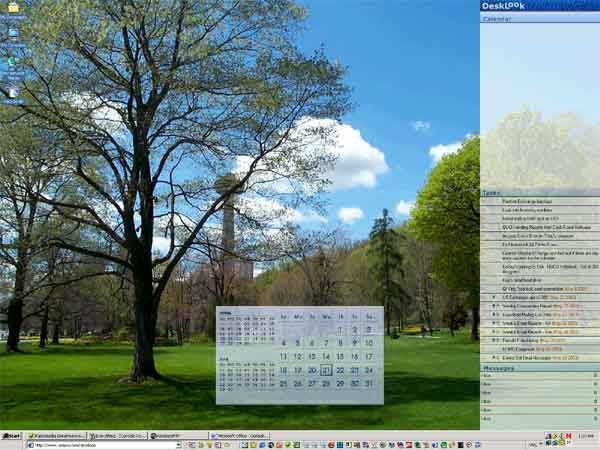
There is also an icon in the system tray that shows the day of the month.
When you right-click on that icon, you are presented with several options:

The Settings option brings up another window that lets you customize what
appears on your desktop:

While running, DeskLook used approximately 7 MB of RAM which didn't seem to
affect system performance at all.
Pricing
You can purchase
DeskLook 2.0 directly from XemiComputers
Ltd. for $19.90
US. They have reduced pricing when you purchase DeskLook 2.0 with another one
of their products.
Conclusions
The program works exactly as it is supposed to, but the question is whether or
not you need software to do what it does.
It is a neat program, and if you are really into desktop wallpaper, then this
is probably an enhancement that you will want (if you use Microsoft
Outlook).
I usually have Outlook open all day anyway (both at home and at work), so I don't
really need a 3rd-party program to show me what the actual program shows me when
it is running.
The bottom line is that if you like this sort of thing, then
for $19.90 US, you can't go wrong. The software does come
with a 42-day trial that installs easily and uninstalls just
as
easily, so you can give it a try DeskLook
2.0 before you buy.
Return to FreeHelp Software
Reviews Home Page
Return to the FreeHelp
Headquarters
Return to PCIN.net Home Page
|



