|


A couple of years ago I had the unthinkable happen... my hard
drive died. I lost everything. I never thought I had anything
important that needed to be backed up, but once something like
that happens, you realize that almost everything is important.
Once that happened I purchased both a CD-RW drive and a Zip drive
and I started backing up my data.
For anyone who has tried to find all of their data to backup,
it can be quite a chore. OUTBACK
Plus 3.0 (OP3)
from AJ
Systems tries to help when backing up your Email and Internet
Files.
Their web site states that OP3 has the following features:
- Backup your Outlook Personal Folders (.pst file) in a compressed,
zip compatible, archive.
- Critical Outlook control files are included in the backup.
- Restore the backup data to the same or another machine.
- Backup and restore any additional file(s) along with the Outlook
data.
- Backup and restore Offline storage and Offline Address Book.
- Automatic reminder to backup after a set number of days -
which you may specify.
- Quick Backup - One step backup using the parameters from the
prior backup.
- Backup your Internet Explorer favorites and cookies.
- A log is maintained for each Backup or Restore.
Installation
Installing the software was a simple as it should be. I double-clicked
on the setup file, followed the prompts, and it was ready to go.
The setup file is only 1.3MB and so only took a few seconds on
my cable connection. Then the installation only took 10 seconds.
Once installed, there were 2 icons on the desktop.

Testing
I have Microsoft Office 2000 on my computer and use Outlook 2000
for all of my email, calendaring, and contacts. I have several
PST (Personal Folder files) with thousands of messages. I also
have many email accounts that are checked.
I double-clicked on the OutBack Plus icon shown above had to
accept the license agreement. Then I was presented with a screen
where I entered my product key. It was all very quick, and I ended
up at the main screen (shown below). Since this was the first
time I used the program, I chose the Backup option from this screen.
The program then searches your system for files that it can backup.
The third image below shows all of the items that could be backed
up on my system. I was very impressed that it found all of the
PST files as I have them in several locations, and only a couple
of them are in the default location. The next thing that jumped
out at me was that the Internet Email accounts are backed up.
This has got to be the biggest pain. When I've rebuilt my system,
you either have to recreate all of the accounts, or import them
one-by-one if you remembered to export them. It was very nice
to see that it would all be done as part of the program. It also
backed up my Favourites folder.
The second image below shows the different options for when you
backup files. I made sure that I would backup everything, and
that compression was set to maximum. I then clicked the Next button
to continue. I was prompted for a location to save the file and
accepted the default. The last step is to click the Make Backup
button. I did, but it told me I had to close Outlook first. When
I did, I clicked the button again, it started backing up the data.
It took about 70 seconds to backup my files and 10 seconds to
verify the backup. A log file was then displayed to show me the
results.
The file that OP3
creates has an OPZ extension. The file created in my test was
39 MB. Being curious, I changed the extension to ZIP and tried
to open it in WinZip. It opened just fine and showed me all of
the files that were in the archive. So when it comes right down
to it, OP3
is doing all of the things that you could do yourself manually.
You could manually add all of the files, export the registry settings,
and then zip it all up. You could also set tasks to do this regularly.
You could do all of that, but OP3
certainly makes it a lot easier.
To restore the file, I changed a couple of things, and then started
the program again. I clicked Restore and followed the prompts,
and everything was restored to where it was before I changed anything.
Lastly, the OutBack Plus Quick Save icon starts a backup immediately
based on your current settings.
Images
 |
- This is the main screen
- You can choose to either Backup or Restore the data
|
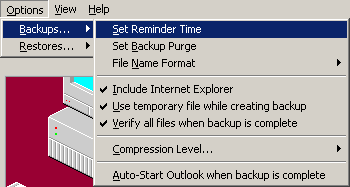 |
- You can have reminders pop-up if you need to backup
your data again.
- You can also choose what to include in the backup and
the level of compression
|
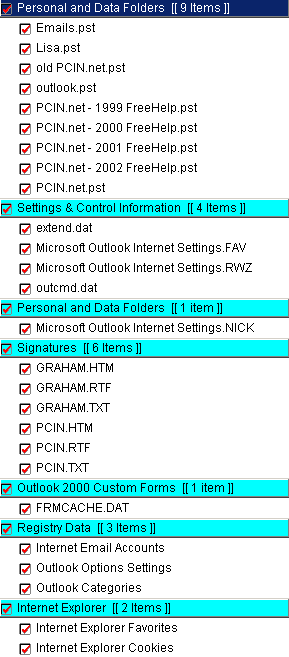 |
- This is the list of things that could be backed up on
my computer.
- It found all of the PST files (Outlook 2000 email files)
and all of my Outlook settings
|
Purchase
You can purchase OP3
from AJ
Systems directly for $29.95.
Conclusions
As I mentioned above, OP3
doesn't do anything that you couldn't do yourself manually. You
might think that you don't need to spend the $30 to do something
you can do yourself, but if you give OP3
a try, you will stick with it. It is quick, can be automated,
and backs up so many different items, it becomes very valuable.
Even that fact that the backup file can be opened in your zip
program of choice is nice. You can extract data as needed if you
didn't want to use the Restore option.
Overall, it is well worth the price. Don't think that data loss
won't happen to you. Be prepared with a good backup plan, and
make sure that OutBack
Plus 3 from AJ Systems is part of that plan.
Return to FreeHelp Software
Reviews Home Page
Return to the FreeHelp Headquarters
Return to PCIN.net Home Page
|



