|


If you use the Internet at all, probably the most indispensable
program you will have (other than your browser and email clients)
is an unzipping program. In the most basic terms, "zipping" is
the process by which files can be compressed so that they aren't
as large (in byte size). You can also "zip" several files into
one zip file, allowing for easy transfer of several files. If
you download files from the Internet, then you deal with zip
files.
There are many commercial programs that will zip and unzip files
for you like PKZip and WinZip, but the program I am most impressed
with is ZipMagic 2000
by Ontrack.
ZipMagic is a full featured program that handles zip, arc, ark,
arj, cab, dwc, gz, lha, lzh, pak, rar, tar, taz, z, and zoo (all
different compression types). ZipMagic has two ways to extract
these files; through the ZipMagic interface, or through the regular
Windows Explorer. This unique way of handling the files makes
using ZipMagic intuitive no matter what level of expertise you
have.
If you prefer to use ZipMagic on its own, you can open up a zip
file, choose the files to extract, and then extract them to your
desired location. There are also several wizards that will guide
you through the process of unzipping, making your own zip files,
and making self-extracting files (files that are programs on their
own so that others without an unzipping program can still receive
multiple files at once).
If you want to avoid a separate program, you can set ZipMagic
up to make Windows Explorer (and other programs that use a Windows
Explorer type interface to open files) see zip files as regular
folders. Mijenix claims this is the Magic in ZipMagic. You can
then open them up and use the files in them just as if they were
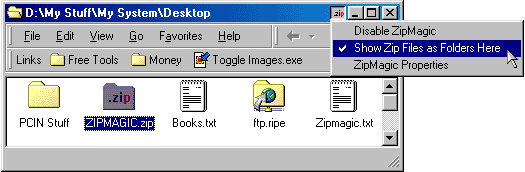
files in a regular folder. In the picture below you can see that
the icon for the ZIP file is similar to a folder. It is plainly
labeled so you know when it will be opened like a folder.
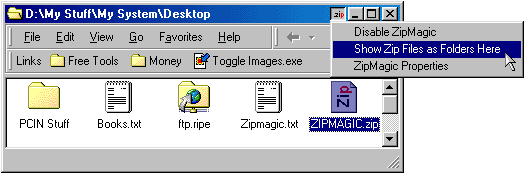
If for some reason you want to open up a zip file in ZipMagic,
then you can just change the setting in the program bar or right-click
on the file. In the picture below you can see that the ZIP file
has its normal icon, indicating that ZipMagic will start in order
to view the files inside.
\
ZipMagic also has many other features such as decoding email
attachments (UUEncoded, XXEncoded, MIME/Base 64, BinHex), a download
manager, and email anti-virus scanning. ZipMagic also comes with
an excellent 126-page manual that covers the basics of zip technology,
how to use the program (basics), how to use the advanced features
(wizards, command line, anti-virus scanning) and a glossary.
I have been using ZipMagic 2000 since it first came out, and
I love it. It is easy to use, and is well worth the $39.95 cost
of the program. You can learn more about the program at http://www.ontrack.com/zipmagic/
and you can buy it at http://www.ontrack.com/buyonline/.
Return to FreeHelp Software
Reviews Home Page
Return to the FreeHelp
Headquarters
Return to PCIN.net Home Page
|



