|
Since Windows 3.x, I've always heard people complain about the
file management capabilities of Windows. Whether called File
Manager
in Windows 3.x or Windows Explorer in Windows 9x/NT, people still
didn't like it. There were many versions of third-party replacements,
and it appears that the current champion is Mijenix
PowerDesk
98 (Mijenix is now part of Ontrack
Data International, Inc).
Power Desk is fully customizable, but I felt that the default
was the most comfortable. The 3-pane layout has the familiar 2-pane
Windows Explorer layout at the top, and at the bottom of the screen
is a third pane that is a viewer that supports about 100 different
file formats from images to spreadsheets. If you click on a file
in the explorer pane above, it will preview the file in this 3rd
pane. Even if it isn't a recognized file extension, the program
still tries to read it. This saves you the trouble of double-clicking
on it and having to tell Windows which program you want to use
to open it.
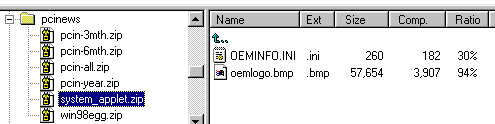
PowerDesk also has built in support for 12 different file compression
formats. You can view the contents of these ZIP files as if they
were folders. As you see in the following image, the ZIP file
would be on the left side with the folders, and the contents would
be on the left. You can add, delete, copy, and move just like
a regular file.
A particularly important feature to security advocates is the
options to shred files You can delete files normally (putting
them in the recycle bin) or you can choose to shred the file.
This will write and erase to that area of the hard drive several
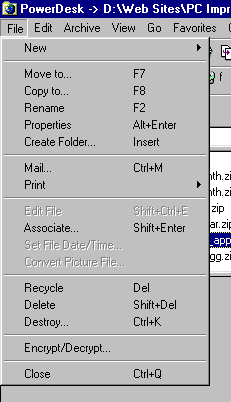
times so that the file is unrecoverable. You can choose the destroy
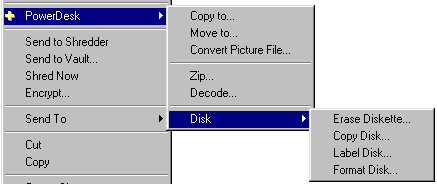
option when in the PowerDesk interface, or you can right-click
on any file, and either send the file to the shredder to be destroyed
later, or shred it right then.
Other right-click context sensitive menu options include converting
images to other formats, zip utilities, moving files, and some
simple disk utilities like format, copy, etc.
PowerDesk is available for $29.95 (US$) on its own, or it comes
for free as part of Mijenix Fit-It Utilities 99.
Return to FreeHelp Software
Reviews Home Page
Return to the FreeHelp Headquarters
Return to PCIN.net Home Page
|