|


For years PowerQuest was the only name in hard drive partition utilities. Over
the last few years others have joined the fray. I recently had an opportunity
to review Paragon Software
Group's Hard
Disk manager 5.5 (HDM55). If you were thinking of purchasing a hard drive
utility, then you had better give this a chance.
One of the first things you notice about HDM55
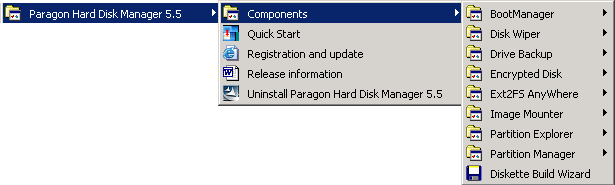
is the number of programs that come in the package. Most of these can be purchased
as individual software products, but you get them all in this package. You get
the following programs with HDM55:
- Boot Manager - Presents a menu at startup that lets you boot to up to 16
different operating systems.
- Disk Wiper - Securely deletes files or empty space.
- Drive Backup - Create backup images to a local disk or a network location.
Also used to copy entire hard disks.
- Encrypted Disk - Secure a hard drive with a username and password.
- Ext2FS AnyWhere - Access Linux partitions in Windows.
- Image Mounter - Read images that you have created.
- Partition Explorer - Similar to Windows Explorer, view the contents of your
partitions.
- Partition Manager - Resize, Copy, Move, Create, Delete, Hide partitions
on your hard disk.
Most of the programs use the same sort of interface. The window is divided
into panes, and the left pane lists the hard drives you have installed and the
partitions that exist. Then the right-hand pane will show the information that
is specific to the program you are running. I did not test all of the program.
Below are my comments on the programs I did review.
Paragon Partition
Manager
Paragon Partition Manager (PPM) is the real reason why I wanted to review
the software. PowerQuest's PartitionMagic has been the leader, and I previously
reviewed it. I wanted to try a similar product from a different company. After
using it, I'd recommend PPM to almost anyone. PPM allows you to copy, move,
resize, create, delete and hide partitions on your computer. It supports any
common desktop PC file system and many server file systems. I tested the product
on Windows 98, Windows 2000 Pro, and Windows 2000 Server, and it worked perfectly
on each operating system.
In almost all cases, the computer reboots and does the work in a native mode
called Paragon Engine. That way there is no disk activity on the partition
that is being modified. The process of converting a 6 GB NTFS drive to FAT32
took about 20 minutes. The speed of the product will depend on the speed of
the hard drive and the overall system speed. But be prepared for this to take
a while. And the large the hard drive, the longer it will take.
Perhaps most notable, although not that important to a home consumer, is
the ability to use this software on Windows 2000 Server (or Windows NT 4.0
Server). Most other products require a different version of the product before
it will work on a server operating system. But PPM worked just great on Windows
2000 Server. If you have been looking for this sort of a tool but didn't want
to spend hundreds of dollars, than PPM might be just right for you. And if
you are just looking for something that will help you with your home PC, then
PPM is still the right choice.

Partition Explorer
For most people, partition explorer won't be too useful. The chances are
you do not have any hidden partitions or partitions that your operating system
doesn't recognize. But if you do, then you can use Partition Explorer to view
the contents. On a standard PC, it works essentially the same as Windows Explorer.
But if you had a Windows 98/XP (NTFS) dual-boot system, you could see the
Windows XP files when you had booted into Windows 98.
Drive
Backup
Drive Backup lets you copy your hard drive contents to another hard drive,
or to duplicate partitions. It can be used for backup purposes (create an
image and burn it to a CD) or can be used for immediate purposes (you bought
a new hard drive and want to duplicate your old drive). I used the product
to copy a 20 GB drive to another 20 GB drive. The process took about 30 minutes
and created an exact copy. Depending on which drive was in the computer, I
could boot from either one.
Disk Wiper
Did you know that when you delete something, you really don't delete it (check
out http://www.pcin.net/help/articles/undelete.php
for more details)? It's true. The program's help file explains it this way,
"A real deleting of files on hard drives is only possible through a complete
overwrite of the original files with (meaningless) data. A simple delete as
executed by all OSes makes files only non accessible on the OS and application
program level (the file names are gone). But the fact is, that the complete
contents of all that files are still there, waiting to be completely recovered,
at least as long as they are not overwritten by new files."
But using a program like Disk Wiper, you can securely delete the files on
your hard drive so they are unretrievable. This is a handy thing. The only
problem is that Disk Wiper only wipes entire disks, or all of the free space
on the drive. It does not delete individual files. I did not test the "Wipe
Partition" option, but I did try the "Clear free space" option,
and it seemed to work properly
Conclusions
Paragon Hard
Disk Manager 5.5 is an excellent program. Each of the products in the suite
cost up to $40. But when you buy the suite, it is only $59.95.
This is an excellent value for all of the utilities that you get.
Overall, Paragon
Hard Disk Manager
5.5 holds its own against the competition. The interface needs some improvement,
but the software is all quite easy to use. And I can't emphasize enough that
if you are looking for a complete set of tools, then this is the product for
you.
Return to FreeHelp Software
Reviews Home Page
Return to the FreeHelp Headquarters
Return to PCIN.net Home Page
|



