|
When Graham and I approached Stardock about doing a review of their desktop
modification software Object Desktop, we weren't really sure about
what was in store for us.
When the software arrived, we were both taken aback. Our first impression: "WOW". The software quickly transformed our
desktops from the regular, familiar Windows GUI to a new, exciting interface that was easily modified.
Object Desktop is a suite of 7 components:
- WindowBlinds
- DesktopX
- ObjectBar
- IconPackager
- SkinStudio
- Object Desktop Theme Manager (WinStyles)
- Component Manager
|
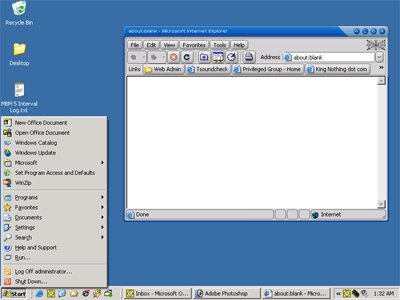
Together, they allow you to change your desktop from this:

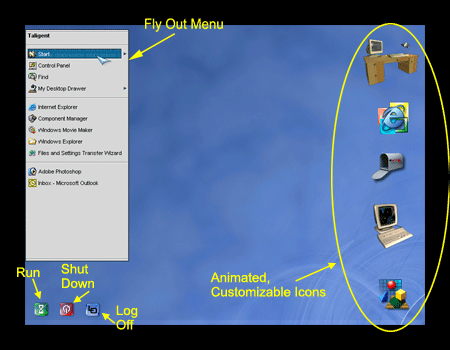
to this
|
Installation of Object Desktop is straight forward, and took about 3 minutes on my test machine (AMD Athlon 1000, 640 MB RAM).
An icon in the system tray lets you know how far along the installer is for each component.
The above transformation was a product of WinStyles. This application allows you to change many aspects of the Window interface and will let you add themes for each of the Object Desktop components in a single file. This integration of component themes provides a simple way to change your windows look. Object Desktop ships with several themes, and many more are available for download at wincustomize.com. It is also possible to apply individual components of the suite to customize windows to your liking.
Components
The following series of images show my desktop with various component settings applied. Click any image for an enlarged view of the desktop.
 |
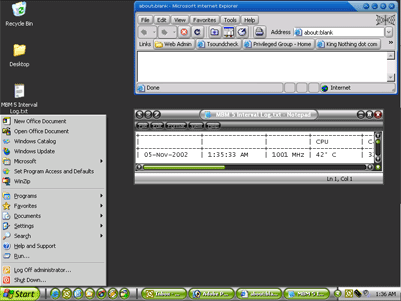
WebBlinds modifies your web browser, it's buttons, scroll bars and menus. |
 |
Window Blinds provides a skinnable interface for Windows programs and dialog boxes. It modifies the look of the taskbar and Quick Launch icons. |
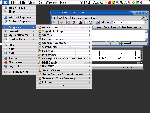 |
Object Bar provides customized menus and shortcuts to programs, documents, or system utilities. The options are limitless. You can even use it as a replacement to the Windows Start Menu. |
 |
Modifying your entire Cursor set is another way you can customize your Windows experience using ObjectDesktop. Download and install entire collections of cursor, or change individual pointers
using CursorXP |
 |
DekstopX is an interactive and exciting replacement of the boring Windows desktop. With themes downloadable from wincustomize.com, you will never have a boring desktop again. Each is different and each has different features that help make them unique. Objects on the desktop serve as launch pads for applications, or a place to present information to the user such as disk space. |
 |
What would new custom desktop be if it used the same icons as the original desktop. Icon Packager will change the existing icons of your Windows environment to match the rest of your theme.
|
Not being overly creative when it comes to this sort of artistry, I did not use the SkinStudio component. SkinStudio allows you to create your own collections for Object Desktop.
Additional Downloads
Along with the supplied components, the objectdesktop.net website has additional components to download. DriveScan, ObjectZip, and ObjectEdit are just a few of the many additional
programs that may be added to enhance the functionality of Object Desktop. These added components provide an additional, excellent value to ObjectDesktop.
Purchase
The entire suite of products, including the additional downloads, will cost $49.95 direct from Stardock, which also gives you a one year subscription to
ObjectDesktop.net, where you can download new components and upgrades to the existing components. CursorXP sells for $10.00 (8.00 for
Object Desktop subscribers. Both may be purchased at objectdesktop.net
Conclusions
Stardock has built in functionality to check the web for updates to the individual components and download them as necessary. What is really nice is the ability to activate or deactivate
different versions as necessary. I am running dual monitors on my machine which posed a minor problem for Object Desktop. The majority of the theme operates on the primary monitor in this situation,
which was not a problem. However, when a window was maximized on the secondary monitor, it was sized to the entire size of the desktop, not just the monitor size. Windows on the primary monitor
maximized correctly.
For users looking for some excitement in their windows installation, Object Desktop satisfies that need. It is an excellent value, and considering the added components available for download, is well
worth the money.
Return to FreeHelp Software Reviews Home Page
Return to the FreeHelp Headquarters
Return to PCIN.net Home Page
|