|
Email marketing was once touted as the golden egg of the Internet. However,
lack of control over content, unscrupulous website operators and the proliferation
of spam has burst that bubble. While email marketing can still be an effective
tool, more and more people are turning to
RSS. RSS is a derivative of
XML that provides a simple mechanism for users to provide headlines and
links to new articles on their sites. In order to view RSS content, an RSS aggregator
is required.
NewsGator by NewsGator Technologies
is an addin for Microsoft Outlook. Because of the Outlook integration, NewsGator requires
a very small learning curve. Users familiar with Microsoft Outlook can use the same
tools to organize, search and archive news posts as they do with their email. NewsGator
can read RSS feeds, Usenet posts, as well as provide a posting mechanism to many of the
most common web log (Blog) software, including Blogger, pMachine, b2 and Moveable Type.
Installation
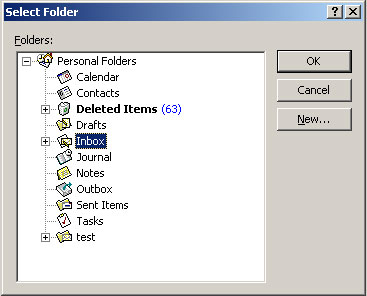
Installation of NewsGator was a simple as it gets. Upon opening Outlook after the install, you
are prompted for activation information, then basic setup which consists of telling NewsGator where
to save your news feeds. An online tutorial is also available at this point.
Subscribing to a feed?
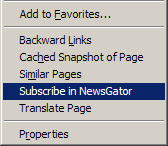 NewsGator provides several methods for subscribing to news feeds. The easiest
way I found was to pick Subscribe in NewsGator from the right click context
menu in Internet Explorer (available when hovering over a link). If a valid RSS or
RDF file can be found,
Newsgater will automatically create the folder to store the posts and downloads the current
feed items. If you are already subscribed you will be informed of that and if it cannot
find a valid file, will produce a message alerting you of that.
NewsGator provides several methods for subscribing to news feeds. The easiest
way I found was to pick Subscribe in NewsGator from the right click context
menu in Internet Explorer (available when hovering over a link). If a valid RSS or
RDF file can be found,
Newsgater will automatically create the folder to store the posts and downloads the current
feed items. If you are already subscribed you will be informed of that and if it cannot
find a valid file, will produce a message alerting you of that.
Subscribing can also be done using the Feed wizard which guides you through
the process of subscribing to a news feed. And for those people who like a
little more control, the manual method provides options for modify the retrieval
interval, provide credentials, or set one of the few other options NewsGator
provides.
Using NewsGator

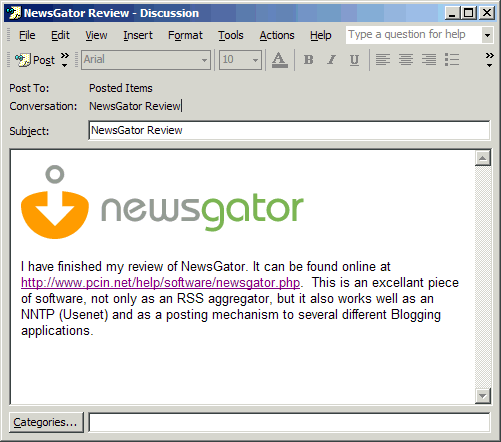 Using NewsGator is as simple as using Microsoft Outlook. NewsGator creates a post
item in the folder you specify for the feed. Because this is a standard Outlook
item, you can use all the tools you normally use within Outlook. Sorting by date,
subject, poster or size is easy as clicking the header title in the message pane.
When Newsgator does find a new post, it alerts using a small popup just about
your task bar.
Using NewsGator is as simple as using Microsoft Outlook. NewsGator creates a post
item in the folder you specify for the feed. Because this is a standard Outlook
item, you can use all the tools you normally use within Outlook. Sorting by date,
subject, poster or size is easy as clicking the header title in the message pane.
When Newsgator does find a new post, it alerts using a small popup just about
your task bar.
By default, Newsgator checks for new posts every 60 minutes. This setting may be
changed on a global basis or independently for each feed. I would have liked the
ability to schedule when feeds are checked with a little more control. When new feeds are
created, they default to an individual folders per feed. You can override this feature
to post more than one feed into a folder, a great way to group similiar feeds.
With Blogging (Web Logging) becoming so popular, and a source of many RSS feeds,
NewsGator has produced several plugins to allow posting to various Blog programs.
Once setup, creating an entry to your blog is as easy choosing the option from the
NewsGator menu, and creating your post. I found the Blogger made creating posts
to a Blog a breeze. I also installed the Windows Media Player 9 Blogging plugin as
well as a similar plugin for Winamp which will automatically include in your post
what you are listening to at the time.. NewsGator allows you to post item's from within
Outlook to your blog as well. Plugins are available for the following systems:
- Blogger
- Radio Userland
- BlogX
- .Text
- MyST MySmartChannels
- pMachine
- b2
- Several other third party plugins are available as well
Deleting subscriptions is as simple as deleting the folder from withing Outlook. This triggers
NewsGator to prompt you to delete the subscription to the feed.
NewsGator supports reading of Usenet postings. In the past, people have had
to use third party programs, or Microsoft Outlook Express in order to read
Usenet postings. I found this to be a valuable resource while at work. Again, with
so much of my daily routine surrounding Outlook, it was one more piece of integration that
made my job a little bit easier. NewsGator 1.3 does not allow for posting to newsgroups,
but it is a feature that is being considered for future releases.
Conclusions
NewsGator exceeded my expectations. It's biggest advantage over other RSS
aggregators is by far is its Microsoft Outlook integration. I already use Outlook
to manage my email, appointments and my contacts so a product that allows me
to read my news within Outlook has several advantages. I found NewsGator to be
very intuitive and easy to use.
NNTP support, posting to various weblogs, and the ability to control
how often feeds are updated have made this a must have piece of software for many
people.
NewsGator is available online directly from NewsGator for $29.00. They will also ship you a CD if you
require one for an additional $10.00.
Return to FreeHelp Software
Reviews Home Page
Return to the FreeHelp Headquarters
Return to PCIN.net Home Page
|