|
Microsoft Outlook is one of the widest used email packages available. It's also goes beyond
email, incorporating calendar and scheduling functions, task tracking, the ability to store small
notes for future reference. Though it has many features, there are still many it doesn't have.
That is where MapiLab comes in.
MapiLab produces addins for Microsoft Outlook, Microsoft Exchange, and Microsoft MSN Messenger.
They have produced a variety of addins providing features such as automated mailing list management,
duplicate email removal, and email scheduling. A complete list can be found at
http://www.mapilab.com/.
Installation
Installation of each of the four addins tested was very simple. Each downloaded zip file contained an
.msi file. The .msi enabled me to right click on the file, and choose install. Upon running the addin
for the first time, I was prompted for registration information.
Duplicate Email Remover
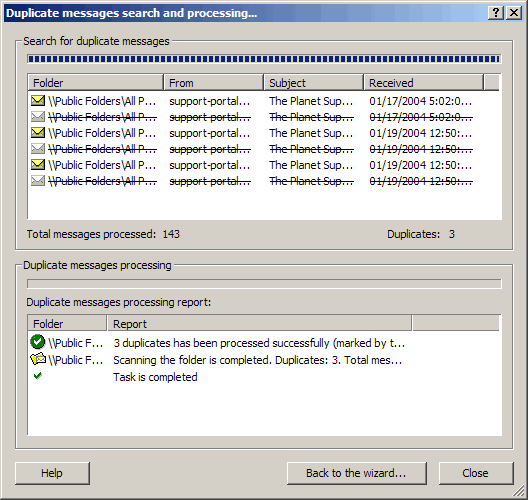
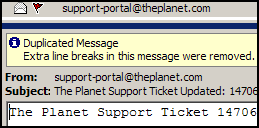
Duplicate Email Remover will search your Outlook folders for duplicate email.
Very basically, it will search the folders you specify and flag the duplicate
emails. In it's more advanced methods, Duplicate Email Remover can move, copy,
flag, delete or permanently delete any duplicate messages. In my testing, Duplicate
Email Remover was able to process 16,979 email messages in 40 folders in only
71 seconds, finding 121 duplicate email messages.
Duplicate Email Remover uses a variety of email attributes to test the validity
of individual emails. The body of the messages are compared, as are some of
the Internet headers, file attachments and sending date and time. Duplicate
Email Remover ignores some of the Internet headers as it is possible for two
messages sent at the same time to be routed along two completely different routes
along the Internet. More on On the same route. Duplicate Email Remover also
do not use Receipt Time and date as part of its criteria. . It even provides
functionality to set certain folders of higher priority to ensure that folders
more likely to have original emails will be less likely to have them moved.
Contacts Verifier
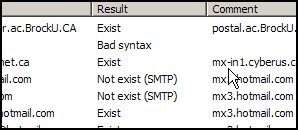 Contacts
Verifier verifies the email addresses in your contact lists are valid addresses.
The testing happens in the background using a feature of the protocol used for
sending mail. Your server (the sender) begins to send a message to the server
that should maintain the mailbox you are checking. That server typically responds
with a message stating it found the user or that the user does not exist. At
this point, Contacts Verifier ends the message sending task properly without
ever having sent a message. Contacts
Verifier verifies the email addresses in your contact lists are valid addresses.
The testing happens in the background using a feature of the protocol used for
sending mail. Your server (the sender) begins to send a message to the server
that should maintain the mailbox you are checking. That server typically responds
with a message stating it found the user or that the user does not exist. At
this point, Contacts Verifier ends the message sending task properly without
ever having sent a message.
MapiLabs explains
that Contacts Verifier will only detect about 70% of invalid address. My tests
showed that number to be significantly less.
Contacts Verifier allows you to check all address in a specified folder, specific
address from your contacts folder, or a single address as needed. Verifying
all addressing in your contact folder is a quick way to keep you contacts folder
up to date by eliminating dead email addresses. Once verified, Contacts Verifier
can flag the contacts with bad address (Either red or white flag) delete the
contact or open the contact to allow you to view and edit the contact directly.
One think I did note was that if a contact has multiple email address listed,
each one will be checked. If one is bad and you decide to delete the contact,
the entire contact will be deleted, not just the bad address.
Send Personally

Send Personally allows adds the functionality of being able to customize your
email messages sent to a distribution list along with making the messages appear
as if they were the only recipient of the email. Used in conjunction with Subscription
Manager, Send Personally can make Outlook a much better option for sending out
a mailing list than it already is.
I had the most trouble with Send Personally. In a strictly Internet Environment, the product
worked as expected. In an Exchange environment, when trying to send from a Distribution List, the
software would fail eventually presenting an error message.
Send Personally allows customization within the subject and body of the email
message and provides customization of the follow fields:
| %USERNAME% |
replaced with recipient's name. If user name is not available, the
macro will be replaced with the part of recipient's address coming before
the "@" symbol (the fist letter case will be changed to cap); |
| %USERFIRSTNAME% |
replaced with first word of recipient's name; |
| %USERLASTNAME% |
replaced with last word of recipient's name; |
| %USEREMAIL% |
replaced with recipient's address; |
| %LIST% |
replaced with the name of distribution list the address was taken
from. If the address was entered right into the "To" field, the macro will
be replaced with the string "[Distribution list name not specified]" when
sending a message. For this reason, it is advisable to use the %LIST%
macro only when distribution lists are being
used. |
Messages received from Send Personally are not only customized, the recipient has
no idea that the same message has also been sent out to more people.
Subscription Manager

Subscription Manager provides a series of tools that will allow an organization
to maintain a small mailing list only using Microsoft Outlook . Of the four
products tested, Subscription Manager has the most options and configuration
needed before use.
In order to use Subscription Manager, you must first set up a folder where
your lists will reside. This is an Outlook folder that will contain Contact
items only. Within this folder you must then set up a single Distribution List
for each mailing list you will want to manager.
If set in the options, allowing or disallowing new subscribers to a particular
list is as simple as adding "subscribe" in the notes field or flagging
list to allow new subscriptions. Templates are used to provide feedback to the
users on the status of their request. Subscribe, Unsubscribe and Help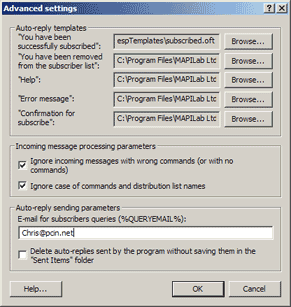 are available commands. Subscription Manager also has an option to force confirmation
of emails by requiring the user to respond to an email which includes a unique
identifier. There is no limit to the number of lists that can be managed with
Subscription Manager.
are available commands. Subscription Manager also has an option to force confirmation
of emails by requiring the user to respond to an email which includes a unique
identifier. There is no limit to the number of lists that can be managed with
Subscription Manager.
Together with Send Personally, these two products make an excellent start for
a small to midsize organization wishing to begin a mailing list, or for family
and friends. One problem with this and many other packages is bounce handling.
The ability to manage bounces (email that failed to be delivered to the intended
recipient) and automatically unsubscribe them after a set number of bounces
would make this an outstanding combination. Additionally, the mail engine in
Outlook may not be fast enough to send out very large lists.
Pricing
MapiLab Outlook Addins are affordably priced and are available as a download online.
Conclusions
MapiLab has produced some very fine addins for Microsoft Outlook. These addins
will make life very simple for someone who uses Microsoft Outlook as their email
package. Eliminating duplicate emails not only saves space, but makes finding
what you are looking for easier. Verifying email address can help keep records
up to date, although I would not rely entirely on it's results as it can give
incorrect results in some situations. And for those people looking to start
a small effective mailing list on an affordable budget, the combination of Subscription
Manager and Send Personally cannot be beat.
Return to FreeHelp Software
Reviews Home Page
Return to the FreeHelp Headquarters
Return to PCIN.net Home Page
|



 MapiLab
Outlook Addins
MapiLab
Outlook Addins