Although not shown in this example, as I was testing I also came across icons that were 96x96 in size with 32-bit colour depth. You can see that 32-bit icons provide far more colour and therefore far more detail. So the question arises, why would I want to extract icons from files? Well, you can extract icons and make your own desktop themes. You can use the icons in programs such as chat programs. You could also use the icons on a web page. When you find an icon that you want, you can choose to extract the icon as either an ICO, GIF, or PNG file. You can also copy the image to the clipboard to paste into another program. You can also collect icons and save them in a library file. An Icon Library (ICL) file is a standard format where you can save many icons in the same file. In the past I had downloaded a few ICL files that contained a collection of icons showing the logs of Major League Baseball teams. I never had a program to open the icons with. I opened the library and all 30 logos showed up. I can now extract any of the icons, or add/replace icons if I wish. Icon Catcher 4 is straightforward to use, but does have a few options that you can change if needed. You can change the following settings:
ConclusionsIcon Catcher 4 by Helexis Software is a simple, yet useful tool. To be honest, there are many tools out there that will do similar things, and I haven't tried them. But I can't see them being any easier to use than Icon Catcher. Add to that the fact that the program also allows you to work with Icon Library files, it is well worth the price. You can purchase Icon Catcher 4 through Helexis Software site for $19.95. Return to FreeHelp Software Reviews Home Page Return to the FreeHelp Headquarters Home |
Overview |
Subscribe |
Unsubscribe |
Latest Issue |
Previous Issues Free Help Headquarters | Free Help Downloads | PCIN Test Systems Make Suggestions | Recommend PCIN | Support PCIN | Survey | PCIN.net Site Search Poll of the Week | Privacy Policy | Links | About Me | Contact Me |
||||||||




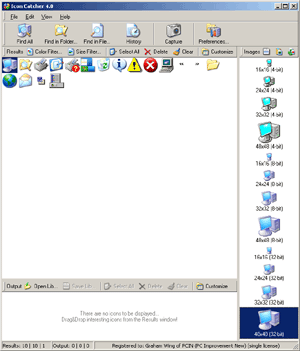 The
program is very easy to use. You can search for all icons on your computer,
in a specific folder, or in a specific file. It searches for stand-alone
The
program is very easy to use. You can search for all icons on your computer,
in a specific folder, or in a specific file. It searches for stand-alone