|


No matter what you use your computer for, you probably take some
time every once in a while to play. You might listen to a CD through
the computer. You may play some solitaire. You may be a fan of
screensavers. Whatever your choice, what better company than one
named Play, Inc.
to provide you with some of the best options.
Play has a group of programs called Gizmos
98 (the most recent update was in the summer of 1999) that
according to the packaging "dramatically upgrades four vital
areas in Windows: File Security, Picture Management, Desktop Accessories
and Visual Entertainment." The programs that do this are:
|
Calendars
- yearly
- monthly
- weekly
- daily
Games
- 5 different solitaire games
- a picture puzzle game
CD Player
Themes
Picture Explorer
(an image viewer)
Performer 98
(a presentation program)
|
Calculators
- standard
- financial
- scientific
- programmable
Clocks
- wall
- sports
- desk
- nightstand
Vault
(password protected folder)
Shredder
(a secure way to erase files)
Screensavers
|
I'd like to focus on the CD Player, the Calculators, the Screensavers,
and the Shredder.
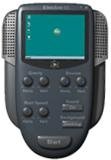
 The
Pro Linear CD Player has a very attractive interface that comes
with all of the standard options (play buttons, programmable play
list, etc.). It also adds the volume, treble and bass (if your
sound card supports it) controls to the main screen so you don't
have to go searching through any menus to find them. One of the
nicest features is the database of CD titles and songs that the
comes with the program. If you buy a new CD that isn't in the
installed database, through the player you can connect to an online
database and get the info on the CD. I have an older classic rock
CD that came with an Entertainment Weekly subscription. It obviously
isn't that well known or widely distributed CD, but the database
recognized it and all of the songs correctly. The
Pro Linear CD Player has a very attractive interface that comes
with all of the standard options (play buttons, programmable play
list, etc.). It also adds the volume, treble and bass (if your
sound card supports it) controls to the main screen so you don't
have to go searching through any menus to find them. One of the
nicest features is the database of CD titles and songs that the
comes with the program. If you buy a new CD that isn't in the
installed database, through the player you can connect to an online
database and get the info on the CD. I have an older classic rock
CD that came with an Entertainment Weekly subscription. It obviously
isn't that well known or widely distributed CD, but the database
recognized it and all of the songs correctly.
 I
have never found much use for the calculator that comes with Windows.
It really doesn't do much, and is quite plain. Well, Play decided
to do something about this by creating 4 different calculators.
There are Standard, Financial, Scientific, and Programmer calculators.
The first 2 are basically the same as the Windows calculator,
but which come with nicer interfaces. These last 2 calculators
wouldn't be of much use to anyone, except for the fact that you
can print out your calculations. It is just like an adding machine
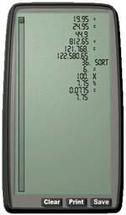
that types out what you enter onto a tape. All of the calculators
have the option to display an electronic paper roll (see image
on right). It looks just like the physical one, and you can print
it out. This makes especially useful for students who need a record
of their work, not just the final answers. You could do your math
homework on the computer and print it out to show the teacher. I
have never found much use for the calculator that comes with Windows.
It really doesn't do much, and is quite plain. Well, Play decided
to do something about this by creating 4 different calculators.
There are Standard, Financial, Scientific, and Programmer calculators.
The first 2 are basically the same as the Windows calculator,
but which come with nicer interfaces. These last 2 calculators
wouldn't be of much use to anyone, except for the fact that you
can print out your calculations. It is just like an adding machine
that types out what you enter onto a tape. All of the calculators
have the option to display an electronic paper roll (see image
on right). It looks just like the physical one, and you can print
it out. This makes especially useful for students who need a record
of their work, not just the final answers. You could do your math
homework on the computer and print it out to show the teacher.
 I
am not a big fan of screensavers. With the advancements in power
management features of monitors, and the quality of the electronics,
screensavers don't don't have the same purpose as originally intended.
They are more for fun, and the 4 included screensavers meet that
criteria. Each screensaver comes with a control panel where you
can customize the colours, sounds, speed and more. There is Electro
98 (a ball that bounces around your screen with sound effects),
Video Cube (a cube that you can display pictures in as it rotates),
Scenic (a 360º panoramic view of some beautiful scenery that
rotates through the monitor), and the Colour Organ (a screensaver
that generates patterns of colour depending on the music played
in the Pro Linear CD Player). I
am not a big fan of screensavers. With the advancements in power
management features of monitors, and the quality of the electronics,
screensavers don't don't have the same purpose as originally intended.
They are more for fun, and the 4 included screensavers meet that
criteria. Each screensaver comes with a control panel where you
can customize the colours, sounds, speed and more. There is Electro
98 (a ball that bounces around your screen with sound effects),
Video Cube (a cube that you can display pictures in as it rotates),
Scenic (a 360º panoramic view of some beautiful scenery that
rotates through the monitor), and the Colour Organ (a screensaver
that generates patterns of colour depending on the music played
in the Pro Linear CD Player).
 The
shredder will be of interest to those who want privacy on their computer. If
you have read the article at http://PCIN.net/help/articles/undelete.php,
you know that when you delete a file, you haven't really destroyed it. It can
be retrieved with simple utilities. The shredder lets you delete a file in such
a way that it is unrecoverable. You can shred a file by choosing a right-click
menu option, or you can drag a file onto the Shredder on the desktop (this is
the icon for it), which works like the recycle bin. You can collect files in
the shredder before you actually shred them. The
shredder will be of interest to those who want privacy on their computer. If
you have read the article at http://PCIN.net/help/articles/undelete.php,
you know that when you delete a file, you haven't really destroyed it. It can
be retrieved with simple utilities. The shredder lets you delete a file in such
a way that it is unrecoverable. You can shred a file by choosing a right-click
menu option, or you can drag a file onto the Shredder on the desktop (this is
the icon for it), which works like the recycle bin. You can collect files in
the shredder before you actually shred them.
A couple of notes...
Gizmos98 comes with a 240 page manual. This is unheard of for
a relatively basic program. It goes into great detail on how
to use each of the accompanying programs and how to customize
them.
Play, Inc. seems like a very playful company, which makes me
want to buy more of their products. For instance, on the inside
of the CD slip cover (not a case), right at the bottom, it says,
"It's tough to read things that are all the way down here,
isn't it?" In the small print is also says, "We promise
not to give your name to anyone... we are actually conducting
a test to verify that our top secret alien technology is working
properly. Implemented into our packaging is a Corrugated Identification
Transmitter (C.I.T.) which upon picking up our box, we have
actually imprinted your fingerprint, thus entering your prints
into our database. However, due to the extreme complexity of
this project, routine tests (like this one) are required."
All of this makes the company seem more personal than some
of the "big" ones. It isn't a faceless corporation.
It seems to made of employees who have fun, and who take pride
in their work. This really impressed me.
You can pick up a copy of Gizmos98 at your local computer software
store or online for approximately $49.95.
Return to FreeHelp Software
Reviews Home Page
Return to the FreeHelp
Headquarters
Return to PCIN.net Home Page
|



