|

Do you have several hundred fonts on your system? Do you
ever wonder what they look like? There doesn't seem to be
an easy way to compare the look of different fonts, and
I have found it quite frustrating. My wife loves to put
fancy fonts in her documents, and she spends way too much
time trying out one, then another, then another. Well, I
have finally found a program that will save her some time.
FontLook, by Glenn Alcott, is a smooth little program that
will let you look at fonts in all sorts of ways. You can:
- look at each font and its properties
- look at large preview of chosen fonts
- View the available characters from that fonts set
- Preview several chosen fonts at once
- Preview/Install new fonts
You can customize almost any display feature, including
size of output, style (bold, italic), and even the text
that is displayed.
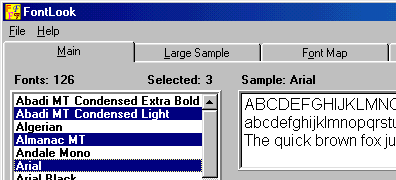
Choose desired fonts
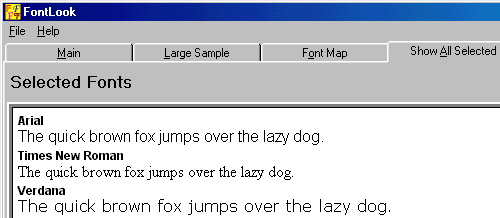
Preview several fonts at once
The 2 screenshots above show some of the features of FontLook.
It is very easy to use. You just pick the fonts you want
to work with (image 1) and then you can compare them (image
2). A full screenshot of FontLook is available at http://www.galcott.com/fontlook.htm
Of course you probably don't want to open this program
up every time you want to compare fonts. There is an option
to print out your samples. You can print out just 2 fonts
so you can do a closer comparison, or you can print out
a sample of all of them so you can see all of the fonts
available.
FontLook is a very useful utility and it is certainly worth
the $19 registration cost. You can learn more about FontLook,
purchase a copy, or download a trial at http://www.galcott.com/.
Return to FreeHelp Software
Reviews Home Page
Return to the FreeHelp Headquarters
Return to PCIN.net Home Page
|



