|

Flash
File Recovery by Panterasoft
Digital camera memory cards are nearly indestructible,
though that does not mean that the images you store on them cannot be lost.
All to often pictures are accidentally erased or memory cards are formatted.
Thanks to Flash
File Recovery by PanteraSoft,
your valuable images may not be lost.
Flash File Recovery allows for the recovery of erased images from many different
types of media including Compact Flash, Smart Media, Secure Digital, Memory
Stick, Micro Drives and many more. It can also recover files from corrupt and
damaged media as well.
Installation and Usage
Flash File Recovery installs very quickly after downloading the small installation
file from the web site. Usage is very simple, and is guiding along in a wizard
like interface.
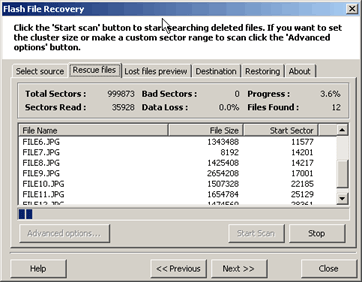
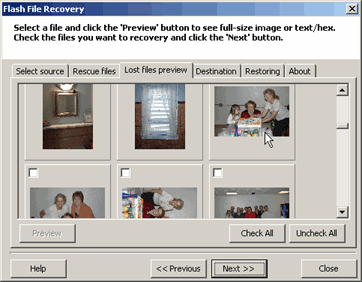
Recovery of images could not be easier. It is a quick process completed in
very few steps. To begin, select the drive your media occupies. Next, choose
the recovery method. For recently deleted files, a fast scan should be all you
need. This scans the FAT, or
the file system index, to determine where the files reside and recover them
from there. For damaged cards, formatted cards, or cards that have been used
since deleting the files you wish to recover, a full scan is necessary. This
scan searches the media, sector by sector, looking for files to recover.
After the search, a listing of the files found on the media is presented along
with their file size and starting sector. A preview of lost files makes selecting
which images to recover a breeze. Next, pick the location you would like to
restore the files to and finally, start recovery.
Testing
I tested Flash File Recovery with a Sandisk 512MB, non write-accelerated compact
flash card. I performed a full scan on the card looking for deleted images.
The scan took 53 minutes to complete using a USB 1.1 card reader connected to
an Athlon 1Ghz PC with 512 MB or RAM. I was running Windows XP SP1. The software
recovered 271 files of which 246 were usable images. The camera only recognized
that there were 55 images on the card at the time.
I then place the card back in the camera and performed and in-camera format
of the card. Re-running Flash File Recovery on the newly formatted card resulted
in finding 242 usable images.
Using the Fast Scan setting of the software did not work for me. I contacted
Panterasoft about the error and was informed that some camera's (including
my Canon) do not behave well with this method. The recommended method of recovery
is the full scan though, and given the number of files found, would fully agree.
Purchase
Flash File Recovery is available for purchase directly from Panterasoft for
$49.50 US. As a photographer, this is a low price to pay if it can save the
loss of important images. PCIN.net subscribers will receive a 15%
discount from Panterasoft when they purchase Flash
File Recovery.
Conclusions
Digital photography has eased the ability for people to take many more photographs
than previously affordable. However, it has also made it very easy to lose photos
already taken, either buy accidental or deliberate deletion, or because of memory
card corruption or failure. Flash
File Recovery should be considered part of
everyone's digital toolkit to recover those lost images. The software works
well, is easy to use and provides a graphical view of recoverable images to
help select what to restore and what not to.
Return to FreeHelp Software
Reviews Home Page
Return to the FreeHelp Headquarters
Return to PCIN.net Home Page
|



