|

Quite a while ago we reviewed Email
Saver Xe 1.6, a utility to help users backup their email data. At that time
was program was by Amic
Games, but it is now offered by WinGuides
Software. You may recognize WinGuides
from their excellent
site that has hundreds of registry tweaks.
Email
Saver Xe will allow you to back up your email data and settings from
many email programs such as Microsoft
Outlook (97, 98, 2000, XP), Outlook
Express (5, 6), Eudora (5, 6), Netscape
Messenger (6, 7) and Opera (6, 7).
Installation
I installed Email
Saver Xe 2.0 on two computers with Windows
XP (it will work
on all recent versions of Windows). Both computers
use Microsoft Outlook; one in a Microsoft Exchange 5.5 environment (server-based
storage), and one in an Internet email environment (using PST files). The software
installed easily and without problems on both computers. When the program was
run the first time, there
was an extra button on the main screen in red that you could click to register
the software. Registration was as simple as entering the information provided,
and once registered, the button disappeared.
Testing
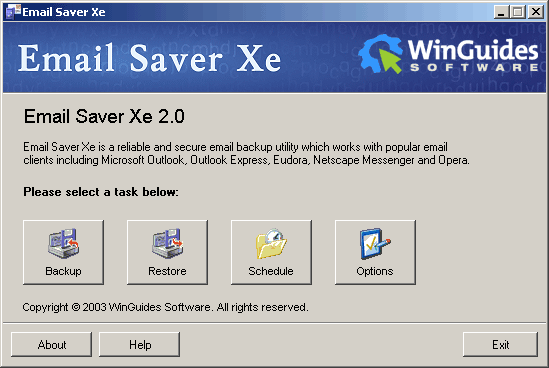
The main screen of Email
Saver Xe 2.0 is very simple. There are 4 buttons
to choose
from which are all self-explanatory.
When you click the Backup button, you
are presented with a list of supported programs (there is an option to show unsupported programs) that you have installed on your system that Email Saver Xe can backup. You can choose what to backup, a backup folder location, and then you can choose to protect the backup file with a password. You can also choose whether to create 1 large backup file or multiple files to fit on a floppy, a Zip 100, Zip 200, CD 650,
or CD700. If your email client is open, you will be prompted to close it. The
software than backups up the specified data into a EBK file. This is a proprietary
format that is associated with the Email
Saver Xe 2.0 program. You can double-click
on any EBK file and the program will open and start at the Restore
screen.
When the program was run on the computer in an Exchange environment, the backup
file was only 205 kb, even though my mail folder was approximately 79MB.
The software recognized that there were no emails stored locally, and didn't
backup the data that was stored on the server. It did however backup various
settings.
When the program was run on the computer setup for standard Internet email,
the backup file was 81 MB. I have 4 PST files
that are 171 MB, and when I zipped them up using the Maximum (portable) setting
in WinZip, the file ended up
being 82 MB. The software also backed up various settings.
There are very few options for the program. You can choose what language
to run the program, a default backup folder location, and whether to show unsupported
email clients.
You can however choose to schedule backups. When you press the Schedule button,
you have the same choices as when you manual backup the data. You can also choose the frequency, time
of day, and whether to overwrite the last backup or to always keep a certain
number of backups. This worked flawlessly.
The Help button brings up a very basic explanation of what the program does.
I initially felt like this was disappointing, but as I used the program more,
I realized that there isn't really much more to include in a help file. The
steps you follow to backup and restore are straightforward and don't require
additional help.
Purchase
A single license for Email
Saver Xe 2.0 sells for $39.95
while multi-user packs are also available. The software comes with unlimited
free upgrades and email technical support for one year.
Conclusions
The software was very easy to install, registration was simple, and the program
was straightforward to use. I was able to backup and restore information with
ease on the same computer, and I was also able to restore information to a
different computer, as long as it had the same version of Outlook.
Email is a critical form of communication. If you've ever lost an important
email, you know how frustrating it can be. If you don't have any utilities
to help you backup your email data, then Email
Saver Xe 2.0 is a valuable tool
to own.
If you already have Email Saver Xe, then then you
probably don't need to upgrade. There didn't seem to be much of difference
between 1.6 and
2.0. But if you don't
have
anything to backup the data from your email client, then it would be wise to
purchase the software.
Return to FreeHelp Software
Reviews Home Page
Return to the FreeHelp Headquarters
Return to PCIN.net Home Page
|



