|
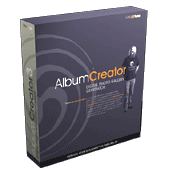
Firmtools Album Creator 3.3
Album Creator by Firmtools
is a great piece of software that will help you create imaginative and interesting photo albums to display your
digital photos. Album Creator creates galleries in both HTML and for more interesting galleries,
Macromedia Flash. Album Creator uses
a very simple wizard driven interface to create it's impressive galleries. With just a few simple
clicks of your mouse and a couple of minutes, you can have a Flash driven gallery on your website to share with
friends and family.
Usage
The wizard begins by providing the choice of creating a new album, or modifying an existing album. Regardless of which item you choose,
you end up at the Album Theme screen. This allows you to pick from any of your installed themes. The themes are sorted into categories:
- Advanced Themes: Themes used for emailing photos
- Flash Themes: Themes that turn your gallery into a Macromedia Flash presentation
- HTML Themes: These themes are static in nature, though still very attractive
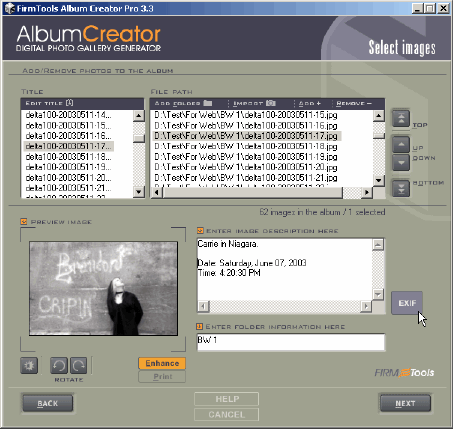
After selecting your theme, you can then add folders or individual photos to
your album. You also have the option of importing images from any TWAIN
devices you may have on your systems such as a web camera or scanner. Comments
may be added to each image at this point as well as importing EXIF
information that will also appear on the image. Depending on the theme, importing
folders will create the same folder structure in your album.
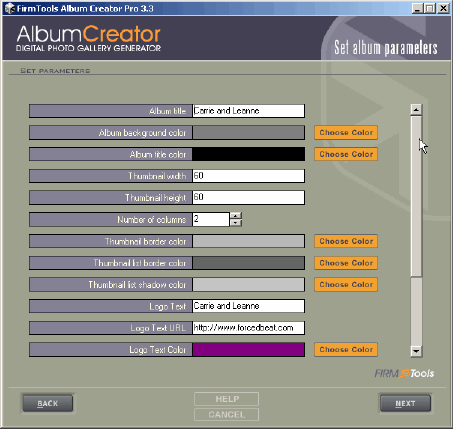
Upon completion of image selection and adding comments to images, the next
step is to customize your presentation. Attributes of the album such as colour,
photo size, thumbnail size, and text can all be modified. Each template has
it's own list of customizations. Before publishing your presentation to the
Internet, you can generate it locally allowing you to preview your creation
and make modifications before spending the time uploading it to your server.
Purchasing
Firmtools Album Creator is available in three versions. Pro, Basic and Lite.
The Pro version gives you unlimited downloading of themes, comes standard with
more themes, can read more file types and includes Photo Enhancer. The Basic
version provides fewer themes and files types but still includes the Photo Enhancer.
The Lite version provides even fewer themes, the same number of file types as
the Basic version, but does not include the Photo Enhancer. The Photo Enhancer
can be run from within Album Creator, or as a stand alone application and provides
basic editing tools such as resizing and cropping, sharpening, removing red
eye and colour adjustments. Though many of these tools are available in most
other image editing products, I appreciated having quick access to them while
selecting and arranging images within Album Creator.
Album Creator Pro is $39.95,
Album Creator Basic is $24.95 and the Lite version
is $14.95. Firmtools also offers a Business License for $99.95. The Business
license is required if you will use the software to create albums to be used
in a commercial context.
Additionally, theme templates may be purchased online using a point credit
system. Points are purchased in bundles of 10, 20, or 50 points for $1.00 per
point. Themes range in price from free to 3 points. Users who purchase a professional
license get unlimited downloads of themes for free.
Conclusions
Firmtools Album Creator 3.3 can quickly create attractive galleries that can
be viewed locally, on the Internet or sent through email. The wide range of
templates ensure that your galleries will stand out from the usual table layout
that so many other products seem to produce. The interface was easy to use and
the software worked quickly creating galleries in both HTML and Flash formats.
Return to FreeHelp Software
Reviews Home Page
Return to the FreeHelp Headquarters
Return to PCIN.net Home Page
|



