|
If you are building or maintaining a web site (other than in free web space),
probably the most essential tool is an FTP program. FTP (file transfer protocol)
is the method in which you can copy files from your hard drive to your web
server (among other things). Most people know of CuteFTP
and WS_FTP,
but perhaps the least well known, but which I consider the best, is AbsoluteFTP
by VanDyke Software, Inc. Not
that nobody knows about this, it is just not as common as the others. Let me
explain why you should consider it.
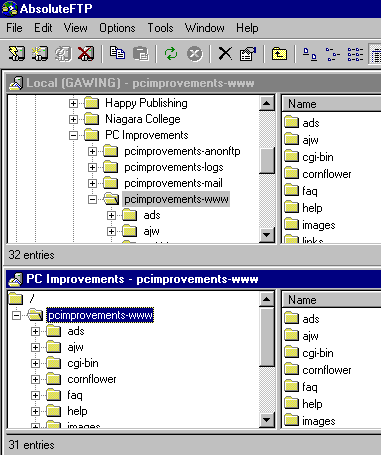
The interface is a 2-pane window where one pane is a Windows
Explorer type display of your hard drive contents, and the second
pane is a Windows Explorer type display of your web site (see
image below). This makes it very convenient to at a glance compare
the directory structures. You can customize the interface and
decide whether you want your hard drive or your web server in
the top pane. You can simply drag an item from one pane to another
to copy the file. When you do this, your will have a dialog box
appear that asks you whether you want to transfer the file in
ASCII mode or binary mode. Depending on the file type, you will
always need to use one mode for every transfer. You can do this
by clicking on a check box that tells the program to always use
the same mode for that file type.
Another useful feature is the ability to change file permissions
on files on your server. On Unix systems, you can set who is allowed
to access the files and execute them. Most FTP programs allow
you to change the option by clicking on check boxes or by inputting
the CHMOD numbers (777 for example). AbsoluteFTP gives you both
options, so you can choose the method you are most comfortable
with.
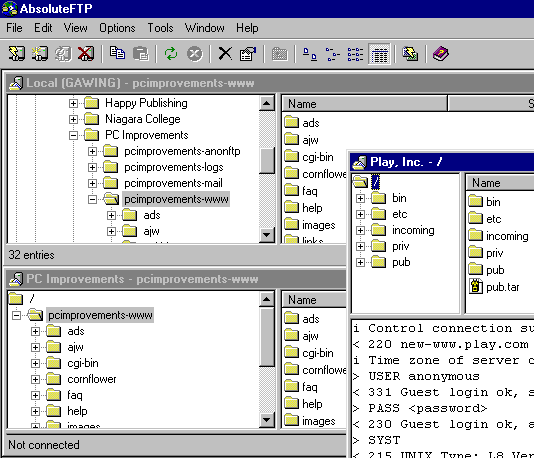
One of the most interesting features is the ability to transfer
files between web servers without having to download the file
to your computer and then upload it to the other server (see image
below). You can open a new FTP session and another window opens
up with only the contents of the new server. You can then drag
and drop between either your hard drive and the new server, or
between the original server and the new server. This can be particularly
useful when transferring large files. It might be quicker to upload
to one than the other. You can upload to the quicker server, and
then transfer directly to the other server. This second transfer
will be very quick as both servers normally have very quick connections
to the Internet.
Another good feature is the ability to connect directly to a
sub-directory on your server without having to navigate to it.
Most web servers only allow 60 seconds or so of inactivity before
they disconnect you. You are still connected to the Internet,
but need to reestablish the connection to the server in order
to transfer files. Most programs force you to start in the root
directory and then you have to navigate to the directory you want
to be in. If your connection to your server times out while using
AbsoluteFTP and a directory listing has already been received,
then you can connect directly to whichever directory you wish
to be in.

Being familiar with the Windows Explorer Interface, I find AbsoluteFTP to be easy to use. The ease of use does not take away from any
advanced features, though. The program runs well. After abandoning
WS_FTP and using AbsoluteFTP for a month, it has never crashed
on me. It is a fine program and I would recommend it to any one.
You can purchase AbsoluteFTP for $29.95 from the VanDyke
Software, Inc. web site.
Return to FreeHelp Software
Reviews Home Page
Return to the FreeHelp Headquarters
Return to PCIN.net Home Page
|



