|



Ever since I've had a computer, there has always been Microsoft
Windows. Along with that, I think every computer I've had (or
close to it) has had a Microsoft Mouse. Years ago this was a very
basic mouse with 2 or 3 buttons, and the mouse itself came in
different shapes and sizes. Then a few years ago Microsoft came
out with a mouse which has been duplicated numerous times over.
This mouse was called the Intellimouse and had a scroll wheel
on it. Since then, the mouse has changed at a frantic pace, all
for the better.
I recently obtained one of the newest products on the market,
the Microsoft Wireless IntelliMouse Explorer (WIE), to review.
Installation
The mouse is a USB only advice, so you must have an available
USB port. Many of the other products come with a USB to PS2 adapter,
but the WIE does not. Installation was simple. Plug it in and
it worked on my Windows 2000 computer. It shows up in the Device
Manager as a Human Interface Device. With the mouse working, I
visited the Microsoft Hardware site at http://www.microsoft.com/hardware/
and downloaded the 4.0 version of the IntelliPoint drivers.
The mouse itself has 5 buttons that were very easy to setup.
There are the usual right and left button, along with the now
commonplace scroll wheel that acts as a button. There are also
2 buttons on the left side where the right-hand thumb would be.
The IntelliMouse software lets you program these for different
functions. The default actions are to act as the Back and Forward
buttons on your browser, but if you want them to do something
different, there are over 30 different options.
The mouse comes with 2 AA batteries that installed in the mouse
easily. The IntelliMouse software has a tab that lets you know
whether the batteries are in good shape or not.
Testing
All you can really do with a mouse is use it, and I have for
2 months now without a problem. I just changed the batteries the
other day. This was a big concern of mine when I first got the
product. I worried that I would have to change the batteries every
few weeks. If the batteries last for 2 months, then that is nothing
to complain about.
I have setup the extra buttons to bring up Windows Explorer,
and to act as the Show/Hide Desktop button. This has proved very
valuable.
I couldn't find any information on the range of the mouse, but
I did move the mouse 6+ feet away from the receiver and the mouse
continued to work without a hiccup.
One of the most frustrating things of using a computer is a mouse
cursor that doesn't move when you move the mouse. Well, if you've
ever used an optical mouse, you'll know that this never happens!
There is absolutely no resistance when moving the mouse. There
are also no worries about precision. Although not a graphics designer,
I have used the mouse when working on some family photos in Photoshop,
and found that I could move the mouse as precisely as needed.
Finally, the lack of a mouse ball means that you can also use
the mouse on virtually any smooth surface. And of course you don't
have a mouse ball that will warp or get dirty.
Images
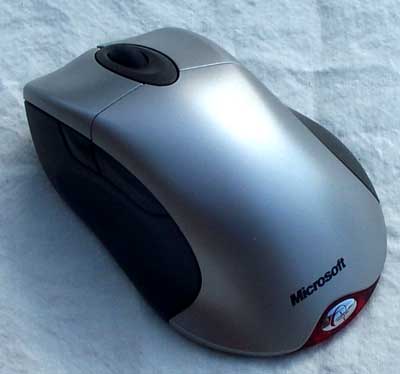 |
- The mouse is shaped nicely to fit in your hard.
- There are 5 buttons which are all easily accessible
(see screenshot below of the IntelliPoint software to
see the buttons more clearly)
|
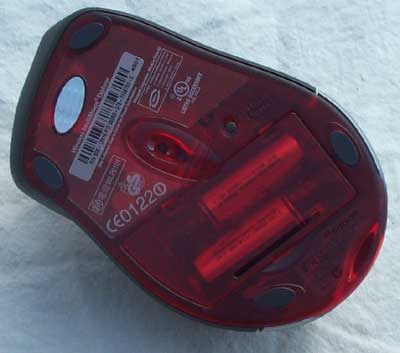 |
- The mouse use optical technology.
- According to the Microsoft information, it scans the
surface that it is on 6000 times per second to provide
"unparalleled accuracy"
- It comes with a pair of Energizer batteries.
|
 |
- Although this is a smaller image, the receiver itself
is approximately the same size as the mouse
- It connects to an available USB port on your computer
- The mouse can be approximately 6 feet away and still
operate smoothly
|
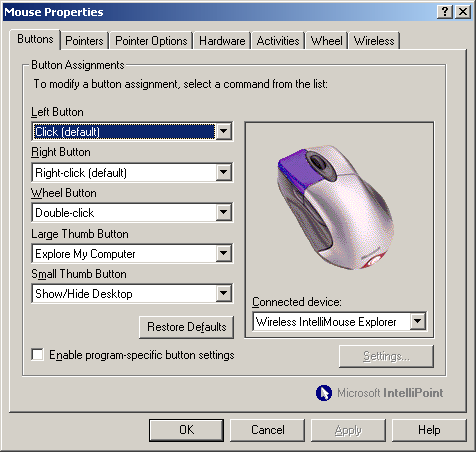 |
- The IntelliPoint software lets you customize the button
assignments.
- It has tab where you can get an idea of how strong the
batteries are.
|
Purchase
You can learn more about the Microsoft Wireless IntelliMouse
Explorer at http://www.microsoft.com/hardware/mouse/wie_info.asp
The suggested retail price is $74.95 US. You should be able to
find this for about
$60 US or $100 CDN.
Conclusions
This is the best mouse that I have ever used. It is comfortable
in my hand. It is wonderful using an optical mouse (there is no
drag from the ball). The extra buttons are handy to use. The only
drawback is its high price. If you don't mind the price, or can
find a deal somewhere, then get the mouse. You'll love it, too.
Return to PCIN Hardware Reviews
Return to PCIN Home Page
|



