|

Logitech Elite Duo
Keyboard/Mouse Combination
The latest offering from Logitech in the Keyboard/Mouse combination category
is the Logitech Cordless Elite Duo. The Logitech Cordless Elite Duo replaced
the Logitech Cordless Freedom Optical previously reviewed by PCIN.
While many of the features have been retained from the Cordless Freedom Optical,
a few changes have been made. To begin with, the keyboard uses two fewer batteries.
The rest of the changes seem to be in the way the keyboard and the software
interact with each other. With the addition of an F-lock button to turn on or
off the F Keys, Logitech has effectively added 12 new keys to the keyboard.
Setup
As with the Cordless Freedom Optical, setup of the keyboard and
mouse was straight forward. The receiver has both USB and a PS/2 and although
the recommended connection is to use both the USB and PS/2 connector, both devices
work fine using only the USB
connector. I downloaded the latest drivers from the Logitech web site rather
than use the drivers that came with the hardware. The entire process took just
under five minutes, start to finish.
Keyboard
 Maintaining
the same physical keyboard structure, Logitech's Zero Degree Tilt, the keyboard
continues to be as comfortable to use as the Cordless Freedom Optical. One concern
I had with the Cordless Freedom Optical was the lack of indication regarding
Num Lock, Caps Lock and Scroll Lock. Logitech has addressed this with the Elite
Duo. The cordless receiver now has a series of four LED's. Each LED
representing Num Lock, Caps Lock, Scroll Lock and F-Lock. While indications
directly on the keyboard would be ideal, this is a wireless keyboard and battery
life would surely be shortened. Maintaining
the same physical keyboard structure, Logitech's Zero Degree Tilt, the keyboard
continues to be as comfortable to use as the Cordless Freedom Optical. One concern
I had with the Cordless Freedom Optical was the lack of indication regarding
Num Lock, Caps Lock and Scroll Lock. Logitech has addressed this with the Elite
Duo. The cordless receiver now has a series of four LED's. Each LED
representing Num Lock, Caps Lock, Scroll Lock and F-Lock. While indications
directly on the keyboard would be ideal, this is a wireless keyboard and battery
life would surely be shortened.
The keyboard features eight preprogrammed, user programmable hot keys. Using
the iTouch software, users can easily customize the hot keys. One of the features
of the software is the ability to create custom menus for the buttons. I was
able to group a list of frequently used databases under one button, or management
utilities under another.
The Elite Duo has incorporated F-Lock support into the Logitech Keyboard software,
iTouch, to allow the often unused F Keys on the keyboard to be reprogrammed.
I have been using computers for a long time and learned long ago that productivity
is increased if your hands do not have to leave the keyboard. As such, I learn
and use the  shortcut
keys that the software packages I use present. Keys such as F1 (Help), F3 (Find),
F4 (Close Program) and F7 (Spell Check) are all common shortcuts that have been
incorporated into many software programs. My personal preference was to turn
off the Flock functionality to allow full standard use of the F-Keys as provided
by the software vendor. F Keys can be programmed for a variety of functions,
including email functions (send, reply, forward), editing functions and shortcuts
to often used folders such as My Documents. Additionally, keys can be programmed
with a pass through, allowing the intended functionality of a key to be access
while redirecting other keys. shortcut
keys that the software packages I use present. Keys such as F1 (Help), F3 (Find),
F4 (Close Program) and F7 (Spell Check) are all common shortcuts that have been
incorporated into many software programs. My personal preference was to turn
off the Flock functionality to allow full standard use of the F-Keys as provided
by the software vendor. F Keys can be programmed for a variety of functions,
including email functions (send, reply, forward), editing functions and shortcuts
to often used folders such as My Documents. Additionally, keys can be programmed
with a pass through, allowing the intended functionality of a key to be access
while redirecting other keys.
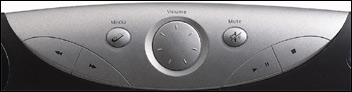
The iNav wheel located on the left side of the keyboard provides quick access
a variety of functions, from volume control, to switching between active windows
and navigating through music and picture directories. The media keys will control
a variety of media players including Winamp and Windows Media Player. Volume
can also be controlled using the volume control wheel on the keyboard.
Mouse
 The
mouse is the same as the one supplied with the Cordless Freedom Optical. The
optical mouse provides smooth operation with consistent tracking. The mouse
features the usual left and right mouse buttons and scroll wheel which doubles
as a button and it also features an additional thumb button which may be configured
using the Logitech Mouseware software for one of many functions, as can the
rest of the buttons. The recent releases of Mouseware have greatly improved
the scrolling of the wheel; it is now very smooth compared to the choppy scrolling
I am used to seeing from Logitech. I have always found Logitech mice to be comfortable,
and the Mouseman Optical is no different. The
mouse is the same as the one supplied with the Cordless Freedom Optical. The
optical mouse provides smooth operation with consistent tracking. The mouse
features the usual left and right mouse buttons and scroll wheel which doubles
as a button and it also features an additional thumb button which may be configured
using the Logitech Mouseware software for one of many functions, as can the
rest of the buttons. The recent releases of Mouseware have greatly improved
the scrolling of the wheel; it is now very smooth compared to the choppy scrolling
I am used to seeing from Logitech. I have always found Logitech mice to be comfortable,
and the Mouseman Optical is no different.
Batteries
As with the Cordless Freedom Optical, the Elite Duo is very conservative with
it's battery usage. With two AA batteries in both the keyboard and the mouse,
the mouse lasted nearly four months while the keyboard has lasted over five
and still shows no signs of failing. Logitech cordless mice use four different
modes to conserve battery usage, each flashing the LED in the mouse more or
less frequently, from 1500 times per second when it is in full use to only two
times per second not in use. Logitech claims the mouse will last three months
using one pair of AA Alkaline batteries.
Other Models
When we contacted Logitech asking to review the Cordless Elite
Duo, they were very accomodating, and ended up sending us not only the Cordless
Elite Duo, but the Cordless Comfort Duo, the Cordless Navigator Duo and the
Logitech MX700 Mouse. All keyboard/mouse combinations feature the Logitech Cordless
Mousman Optical. Both the Elite Duo and the Cordless Navigator feature the Zero
Degree Tilt design and utilize the F-Lock functionality. The Cordless Comfort
Duo is a split keyboard. The split, between 6/7, T/Y, G/H and B/N is a more
natural and ergonomic design that is said to reduce repetitive strains and make
keyboarding more comfortable. It does take a little getting used to though.
Having used one before I was very comfortable with this keyboard. I have had
trouble getting used to the location of the navigation and insert keys (the
set of six keys usually found above the arrow keys.) The Comfort Duo keyboard
has them arranged in three rows of two rather than the usual of 2 rows of three.
We will be doing a full review on the MX700 in the coming weeks.
Each of the keyboards feature enhanced function keys that can
be programmed for a variety of events or menus and mulitmedia functionality.
Both the Navigator and Elite keyboards feature a dial volume control, while
the Comfort features a set of +/- buttons for volume control. All three offer
mute, play, \ause, stop, rewind and fast forward controls as well.
Pricing
Suggested retail pricing for the Cordless Elite Duo is $169.99
Canadian. It is also available through
Amazon for $79.99 US. The Cordless Navigator Duo is available for
$46.99 and the Cordless Comfort Duo for
$70.95.
Conclusions
The Logitech Elite Duo is an excellent combination for those looking to go
from a wired to wireless set up. The features of the keyboard are outstanding.
It is comfortable and can be used for many hours without strain thanks to the
Zero Degree Tilt and the programmable user keys which allow a user to continue
working without having to move their hands from the keyboard. For gamers looking
for a cordless mouse with more resolution, Logitech offers the MX700 as a combination
with the Elite Keyboard. Each of the keyboards we used were comfortable, responsive
and packed full of features. With the outstanding five year warranty Logitech
offers on these devices, you can have confidence that you will benefit from
these keyboards for years to come.
Return to FreeHelp Hardware
Reviews Home Page
Return to the FreeHelp Headquarters
Return to PCIN.net Home Page
|



